IPv6 & ISPs who only provide Half Service
|
by Craig Miller
I have been with one of the major Internet Service Providers (ISPs) in Canada for nearly three years now. The service includes a single public IPv4 address, and a delegated /56 Prefix (via DHCPv6-PD) which was quite stable.
This was until three weeks ago when they changed the IPv4 subnet, and issued a new /56 PD. The single IPv4 address worked as expected, but the /56 delegated prefix did not. It was pulled from a pool of addresses which did not route to the internet.
Having been an IPv6 advocate for over 20 years, this IPv6 brokeness by my ISP was concerning. (henceforth I'll refer as ISP1)
Prefix Delegation Explained
IPv6 is different from IPv4. Each device (laptop, server, etc) must have its own globally unique IPv6 address. This doesn't mean that each device is reachable from the internet, after all, that is what firewalls are for. But in a home network, the customer must borrow some Provider Aggregatable (PA) Addresses from the ISP. This is done via Prefix Delegation, which is part of the DHCPv6-PD protocol.
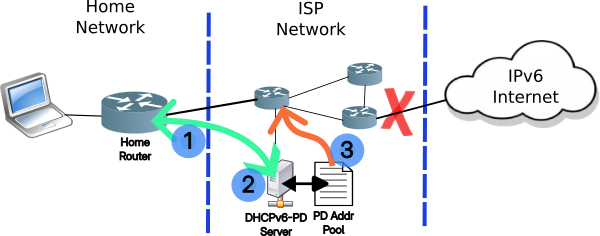
- Home router makes a DHCPv6-PD Request to the ISP
- A server in the ISP network will respond with an IPv6 Block of Addresses (aka Prefix Delegation from the PA pool)
- A route for this block of IPv6 addresses will be added into the ISP network, allowing packets from the Home Network to reach the Internet (and return)
Unfortunately, ISP1 didn't do step 3 (or misonfigured it), and the packets from the home network were blocked from reaching the IPv6 Internet.
Troubleshooting with my ISP1
Not surprisingly the front line tech support at my ISP1 didn't know about IPv6. No worries, an opportunity for education. I explained the problem, and said it was inside their network. Naturally, the script calls for removing all "extraneous" equipment from their network. I was using my own OpenWrt-based router with their cable modem/router in "bridging mode".
Fine, take their Cable modem/router out of "bridging mode" which reboots it, and now it is routing, where it picks up a single IPv4 address, and a non-routed prefix out of the same prefix delegation pool that my OpenWrt router was handed. I connected my laptop directly (via Wifi) to their router, and no surprise, the problem of the non-routed prefix still existed.
Using ones phone to "see" my screen
I was impressed when the ISP1 Tech Support guy sent me a link, and said I needed to open it on my phone. It was a link to a video conferencing server, which allowed tech support to *see" my laptop screen, and take screen shots. I was asked to go to test-ipv6, which reported that I didn't have an IPv6 address. I also showed that ping and traceroute over IPv6 got stuck inside the ISP1 network.
With all of this, Tech Support was able to open a ticket, and have their "back end" open a ticket for their Networking Group.
Troubleshooting with my ISP1 part 2
After 10 days of not noticing any change in my lack IPv6 connectivity, I called Tech Support again to check on the status of my tickets. Sadly this front line person was even less knowledgeable about IPv6. Even though I had an open ticket, he circled back to the fact that I had my own router connected to their cable modem, and that must be the problem. After spending a frustrating three hours, trying to convince him that it was their network which was mis-configured, and that I had proved all of that in my open ticket, I threw in the towel.
Disconnected!
I asked Tech Support to connect me with Customer Service to cancel my service. They did, and clearly I didn't say the correct phrase, because 10 minutes later while I was on hold to talk to their supervisor, my service was cut and my VoIP phone connect went dead.
In hind sight, I should have asked to cancel my service on a given date about a week in advance. But now I was dead in the water. My only connection to the Internet was now my cell data plan (from a different provider)
Getting Internet from the Library
Where I live, one can get on to the Internet (sadly, IPv4-only) at the local library. From there I asked another ISP (ISP2) if they supported IPv6 in my city, they said they did! So I ordered up a connection from them.
Service from ISP2
A couple of days later another cable modem arrives from ISP2, and I plug it in, and surprise, no IPv6. It is an IPv4-only connection. I call up their tech support, and ask about IPv6, and they know what IPv6 is, and confirm that the previous person I spoke to was in error, and in my part of the city only IPv4 was available, and they were very sorry.
A call from ISP1
The customer retention folks called from ISP1, and she wanted to know what could they do to get my back. I explained my requirement to have IPv6. She knew enough of IPv6 to understand my issue. She could offer me a faster service, using a new cable modem/router for less that I was paying for my old ISP1 service.
Connecting back to ISP1
I was hopeful that the new faster service would at least be connected to a ISP1 network with a routed PD Prefix. So I went for it, the new cable modem/router arrived the next day, I installed it, checked that the PD Prefix would route out to the internet (it did), and then put it in bridge-mode and hooked up my own OpenWrt router, and happily got a /56.
What can be learned from this experience?
A few things:
- IPv6 is still new to some Internet Service Providers
- ISPs are still focused on "Speeds & Feeds"
- Some ISPs don't appear to have a way to monitor IPv6, and determine pro-actively if they have a problem
- It is difficult to know if the ISP actually supports IPv6 before one connects to them
Sadly, in Victoria, there are several ISPs which make no claims to support IPv6, and they don't!
Why are ISPs so blind to IPv6?
ISPs still seem to be stuck in "Speeds and Feeds" mode. This worked well when there was only IPv4 to access the internet. But as the Google IPv6 Stat shows, IPv6 is half the traffic on the internet. They need to get out of the mode of "Speeds and Feeds" and into the mode of differentiating themselves from their competition with IPv6 service.
IPv6 Technical Debt
ISPs are not only not monitoring there IPv6 service (when they bother to offer it), but they aren't training their front line support staff. My interactions with ISP1's tech support, brought home the lack of IPv6 knowledge, or that there is even a second Internet Protocol. Trying to explain concepts of Prefix Delegation (via DHCPv6-PD) was quite beyond them. The front line clearly didn't have any idea how a customer gets an IPv6 address, or why it isn't a "modem problem" when the customer is handed a Prefix which the ISP itself doesn't route correctly.
ISPs are doing themselves a disservice by not training the front line on the other half of Internet traffic. Perhaps AI (or LLMs) will do better in the future, but at the moment it is a sad state of affairs.
IPv6 Adoption
With IPv6 Adoption at 50%, as measured by Google, it is time to get with the plan ISPs. Offer & monitor IPv6, and realize that it is the future, which will mean training up your staff. Concentrating on "Speeds and Feeds" is no longer good enough.
A shout out to Hurricane Electric. I have used on and off a IPv6 tunnel via tunnelbroker.net since 2011. During my brief IPv4-only experience (with ISP2), I was able to fire up the HE tunnel after over three years of dormancy, and it came right up. Hurricane Electric, you guys rock!
Notes:
- IPv6 Broken graphic by AI, duck.ai
- Another fun ISP IPv6 Broken with troubleshooting tips, graphic from duck.ai
- Sadly ISP1 is laying off hundreds of their front line people [CBC] (apparently cheaper than training them)
- ISP1 is Rogers.com

19 July 2026