Emulating the Linux IP command on BSD
After talking to Cy, the Linux ip command can't be ported to BSD operating systems (like MacOS X, or FreeBSD). There are too many non-posix kernel calls.
However, the linux ip command is the preferred way to show and set network configuration. In fact, with IPv6, it is the only way to view the neighbour table (think: arp table for IPv6).
Enter shell scripting
Sure shell scripting is not sexy, but much of what happens under the covers on Linux/Unix systems is shell script. The reason is that it is very portable, with minimal dependencies.
bash is shell which not only provides the user with an interactive window to the system, but also is a full blown programming language as well.
Project: Discover IPv6 Nodes on the network: v6disc.sh
v6disc.sh is a shell script to report which IPv6 hosts are on the network. From the beginning it was designed to not only run on a Linux machine, but also an OpenWrt router. So portability between Linux systems was important.
v6disc.sh can be found on github
Discovering Hosts in IPv6
IPv6 has no broadcast, which is a good thing. But there is a need to talk to all IPv6-enabled nodes on a LAN segment. IPv6 uses the special multicast address FF02::1 for all nodes. By sending a ping (ICMPv6 request) to this address, all nodes should respond.
By using this technique, it is possible to discover the hosts (or nodes) that are on the network.
Porting IPv6 host discovery to BSD
So now that we have a finally tuned bash script, how to make it run on BSD? One could rewrite the script for BSD, but then there would be two code bases, and once a feature is added to one, it would have to be ported each time to the BSD version. Not the best solution.
The ip command can be emulated with other BSD-style commands such as ifconfig and ndp
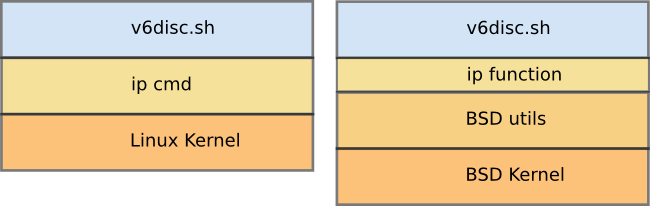
The Power of BASH
As stated earlier, bash is a full programming language, complete with functions, and command precedence. bash will use a function before an external command if they both have the same name. Therefore, an easy way to port the script to BSD is to write an ip function which returns the same information as the Linux ip command.
So a command like:
    # determine MAC of this interface
    intf_mac=$(ip link show dev "$intf" | grep ether | awk '{print $2}')
will run an an external ip command in Linux, but as the function ip in BSD.
Then it is just a mater of creating the function when needed. This is done by checking the OS the script is running on with code like:
#
# Source in IP command emulator (uses ifconfig, hense more portable)
#
OS=""
# check OS type
OS=$(uname -s)
if [ "$OS" == "Darwin" ] || [ "$OS" == "FreeBSD" ]; then
    # MacOS X/BSD compatibility
    source ip_em.sh
fi
The file ip_em_sh includes a large function called ip:
#
# IP command emulator function - returns status similar to the linux IP command
#
function ip {

    # set up default warning message - terminal colours - http://wiki.bash-hackers.org/scripting/terminalcodes
    result=$(echo -e "\033[1;91m WARNING: function not implemented: ip $* \033[00m")
    ...
    echo "$result"
}
Putting it all together
Now armed with an ip command function it is possible to run a bash script relatively un-altered on Linux and BSD.
[cvmiller@pandaboard ~]$ uname -a
FreeBSD pandaboard 11.1-RELEASE FreeBSD 11.1-RELEASE #0 r321309: Fri Jul 21 15:10:30 UTC 2017     root@releng2.nyi.freebsd.org:/usr/obj/arm.armv6/usr/src/sys/PANDABOARD  arm

[cvmiller@pandaboard ~]$ ./v6disc.sh
-- using BSD Compatibility
-- Searching for interface(s)
-- Found interface(s):  ue0
-- INT:ue0  prefixs: 2001:470:ebbd:d0 fdcd:5cb4:d0:0
-- Detecting hosts on ue0 link
-- Discovered hosts for prefix: 2001:470:ebbd:d0 on ue0
2001:470:ebbd:d0:21e:6ff:fe33:e990       00:1e:06:33:e9:90    Wibrain
2001:470:ebbd:d0:4aa2:12ff:fec2:16df     48:a2:12:c2:16:df
2001:470:ebbd:d0::1                      84:c9:b2:54:30:5a    D-LinkIn
-- Pau
by Craig Miller
23 May 2018