Incus and Cgroups

|
by Craig Miller
I wanted to convert my container machine from LXD to Incus. However my Alpine Linux machine was at a version which didn't have Incus in the repo. So I recently upgraded my Alpine Linux machine from version 3.18 to 3.21. The upgrade itself went well. I moved one version at a time by updating /etc/apk/repositories with the new version number and this issuing the following commands:
apk updateapk upgrade --available
After update and upgrade is finished, just reboot, and you have the next version of Alpine Linux.
Why convert LXD to Incus
Why convert to Incus, when LXD was working, you may ask. About two years ago,Canonical in their wisdom decided to take LXD back from the open source license it had been developed and released under. Not sure how that was done, you would have to ask Intellectual Property lawyers, but it was.
As with many Open Source projects, LXD was forked by the main developer, and he (and others) continued to work on the project as Incus.
Therefore, all future open source development will be in Incus.
Converting LXD to Incus
Actually the Incus developers made this very easy. They include a script, not surprisingly, called lxd-to-incus. It does a wonderful job of moving all of your containers to the Incus container system.
However, in my case, the containers were stopped, and couldn't be started. Any attempt at starting Incus Containers were met with the following error:
lxc testinc 20250506013006.211 ERROR    cgfsng - ../src/lxc/cgroups/cgfsng.c:cgfsng_mount:2417 -
No such file or directory - Failed to create cgroup at_mnt 24()
Descending into the Depths of Linux
The question from the error message above is: Why is Incus failing to create cgroups, and what are cgroups anyway?
Doing a little internet research, one discovers that cgroups are part of Linux's virtualization subsystem. This is better explained via a graphic I found on the internet:
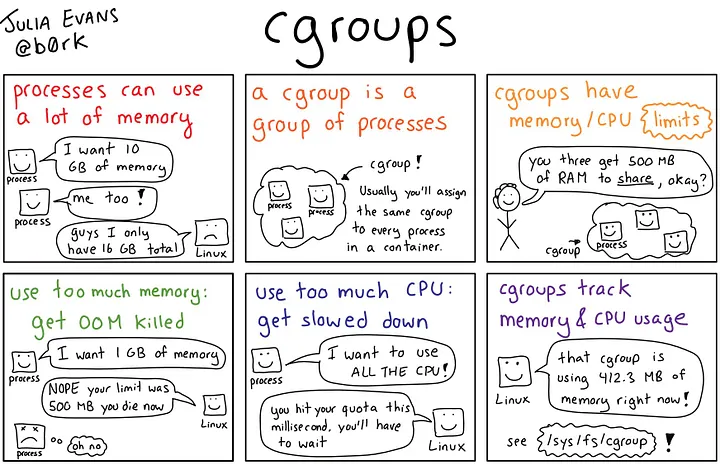
So, cgroups keep virtualized processes from consuming all of the host's memory and CPU, that's a good thing. And Incus is using them to protect the Host, also good.
So why can't incus create cgroups when I try to start a container?
Diving further
A good troubleshooting aid, is looking at github.com Project Issues. Perhaps someone has already run into this problem. And in this case there was.
There was Issue 1259 raised with Incus and Void Linux (another non-systemd distro). However it was closed by the Incus Devs as an OS issue!
Not at the bottom yet
Also hinted in Issue 1259, was that Incus didn't support OS's running both cgroup version 1 and cgroup version 2 instances.
Cgroup versions
Not surprisingly, when Linux introduced the concept of cgroups in the Linux kernel 2.6.24 (2008), it wasn't a perfect implementation. And cgroups became a wild west of controller implementations. The Kernel developers worked in fixing this problem by implementing cgroups version 2, in release Linux 4.5 (2016). See cgroups man page for detailed info.
Sadly there are still large pervasive software projects which still use cgroup v1. One of the biggest is systemd1. Distros then accommodate this by supporting both v1 and v2 simultaneously.
However, it would appear that Incus doesn't like the duality of cgroup support, and it spits out the cryptic message (above).
Finding findmnt
Along this path of discovery, I found a new-to-me linux command findmnt. It is actually a very old linux command, older than 2010 (earliest Man Pages I could find). findmnt provides a tree-like display of what is mounted, and most importantly (for this presentation) the type of mount, as seen on an older Debian machine:
$ findmnt
TARGET                       SOURCE      FSTYPE      OPTIONS
/                            /dev/sda3   ext4        rw,relatime,errors=remount-ro,data=ordered
├─/sys                       sysfs       sysfs       rw,nosuid,nodev,noexec,relatime
│ ├─/sys/fs/cgroup                       tmpfs       rw,relatime,size=4k,mode=755
│ │ └─/sys/fs/cgroup/systemd systemd     cgroup      rw,nosuid,nodev,noexec,relatime,name=systemd
...
Systemd, who needs that?
Looking at my Alpine Linux machine, I did, in fact, have both versions of cgroups
$ findmnt
TARGET                        SOURCE         FSTYPE          OPTIONS
/                             /dev/nvme0n1p3 ext4            rw,relatime
├─/sys                        sysfs          sysfs           rw,nosuid,nodev,noexec,relatime
│ ├─/sys/kernel/security      securityfs     securityfs      rw,nosuid,nodev,noexec,relatime
│ ├─/sys/kernel/debug         debugfs        debugfs         rw,nosuid,nodev,noexec,relatime
│ ├─/sys/fs/pstore            pstore         pstore          rw,nosuid,nodev,noexec,relatime
│ ├─/sys/firmware/efi/efivars efivarfs       efivarfs        rw,nosuid,nodev,noexec,relatime
│ ├─/sys/fs/cgroup            none           cgroup2         rw,nosuid,nodev,noexec,relatime
│ │ └─/sys/fs/cgroup/systemd  systemd        cgroup          rw,relatime,name=systemd
│ └─/sys/fs/fuse/connections  none           fusectl         rw,relatime
But wait, Alpine Linux doesn't use systemd. So why does it need to mount /sys/fs/cgroup/systemd? What if I just unmount that file system with the following command:
# umount /sys/fs/cgroup/systemd
The world didn't crash, the Alpine Linux machine just kept on humming along as if nothing had changed.
Starting Incus containers
Now was the time for the acid test, starting a container.
$ incus start test
$
No error! A good sign. Let's see if the container test is running
$ incus ls
+---------+---------+-------------------+-----------------------------------------------+-----------+-----------+
|  NAME   |  STATE  |       IPV4        |                     IPV6                      |   TYPE    | SNAPSHOTS |
+---------+---------+-------------------+-----------------------------------------------+-----------+-----------+
| test    | RUNNING | 10.1.1.24 (eth0)  | fd10:a1ea:cafe:fd00:216:3eff:fe8b:d944 (eth0) | CONTAINER | 0         |
|         |         |                   | 2001:0db8:1381:5f00:216:3eff:fe8b:d944 (eth0) |           |           |
+---------+---------+-------------------+-----------------------------------------------+-----------+-----------+
Yes! Success!
Using Virtualization and Open Source
Linux is no longer a Unix-like kernel, running GNU user-land utilities developed by the Free Software Foundation. It has become a complex virtualization platform upon which Game Emulators and even Incus Containers can run.
The advantage of running Open Source software is that when running into Linux issues, there's usually others who have run into the same problem, or one can even look at the source code, which I have been known when I am really deep into a problem.
Notes:
Photo credits:
- Lego Linux Image https://miro.medium.com/v2/resize:fit:1358/1*TBWcYYuyBum2qEtg_iounw.png
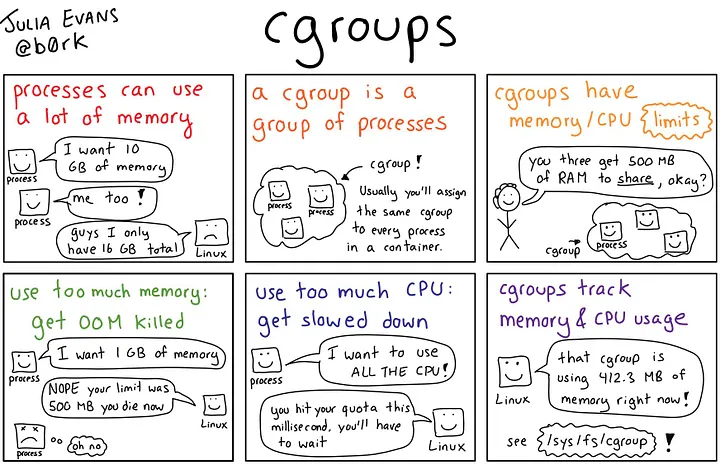
- Cgroup Comic Explainer https://miro.medium.com/v2/resize:fit:720/format:webp/1*eLgMhIu65qlKLzugCIf0Yg.jpeg

31 May 2025